What C2PA 2026 actually does
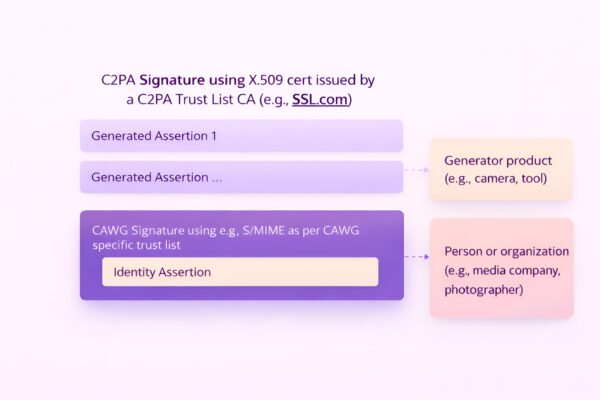
The Coalition for Content Provenance and Authenticity (C2PA) is an open technical standard designed to prove the origin and edit history of digital media. Unlike simple invisible watermarking, which can be stripped or ignored, C2PA uses cryptographic signing to create a tamper-evident ledger attached directly to the file.
This standard allows publishers, creators, and consumers to verify whether an image or video has been altered. When a file is created or edited using C2PA-compliant software, the action is recorded in a secure, signed manifest. This manifest travels with the media file, providing a clear history of its provenance.
The 2026 standards refine this process to address the rise of generative AI. They ensure that AI-generated content is clearly labeled and that human-edited content retains its verifiable lineage. This distinction is critical for legal and regulatory contexts where the authenticity of evidence or media is under scrutiny.
By embedding this data at the source, C2PA moves beyond post-hoc detection. It provides a proactive method for establishing trust in digital content, making it harder for bad actors to misuse media without detection.
Enable Content Credentials in your tools
The first step in adopting C2PA 2026 standards is ensuring your creation software can embed Content Credentials at the point of origin. Without this initial configuration, the cryptographic chain of custody is broken before the content is even shared. Major platforms have integrated these capabilities directly into their workflows, allowing creators to attach provenance data to images, audio, and video files automatically.
Adobe Content Credentials is the most widely adopted implementation for creative professionals. When enabled in applications like Photoshop or Premiere Pro, the software embeds a digital receipt that records the tools used and the modifications made. This data travels with the file, providing a transparent history that viewers can verify through the Adobe Content Credentials viewer or compatible platforms.
OpenAI and other generative AI providers are also implementing provenance signals. When using tools like DALL-E or Sora, look for options to enable content credentials in the settings. These signals help distinguish between human-created and AI-assisted work, adding a layer of transparency that is critical for maintaining trust in digital media.
Open your preferred Adobe application and navigate to the preferences or settings menu. Look for the "Content Credentials" or "Provenance" section. Toggle the setting to "Always attach content credentials" to ensure every exported file includes the cryptographic signature. This step is essential for maintaining a consistent provenance trail across all your creative outputs.

For generative AI platforms like OpenAI, access the account settings or generation preferences. Enable any available options for "Content Credentials" or "Provenance tagging." This ensures that AI-generated or AI-assisted content is automatically tagged with metadata indicating its origin. This step helps users understand the source of the content and adheres to emerging transparency standards.
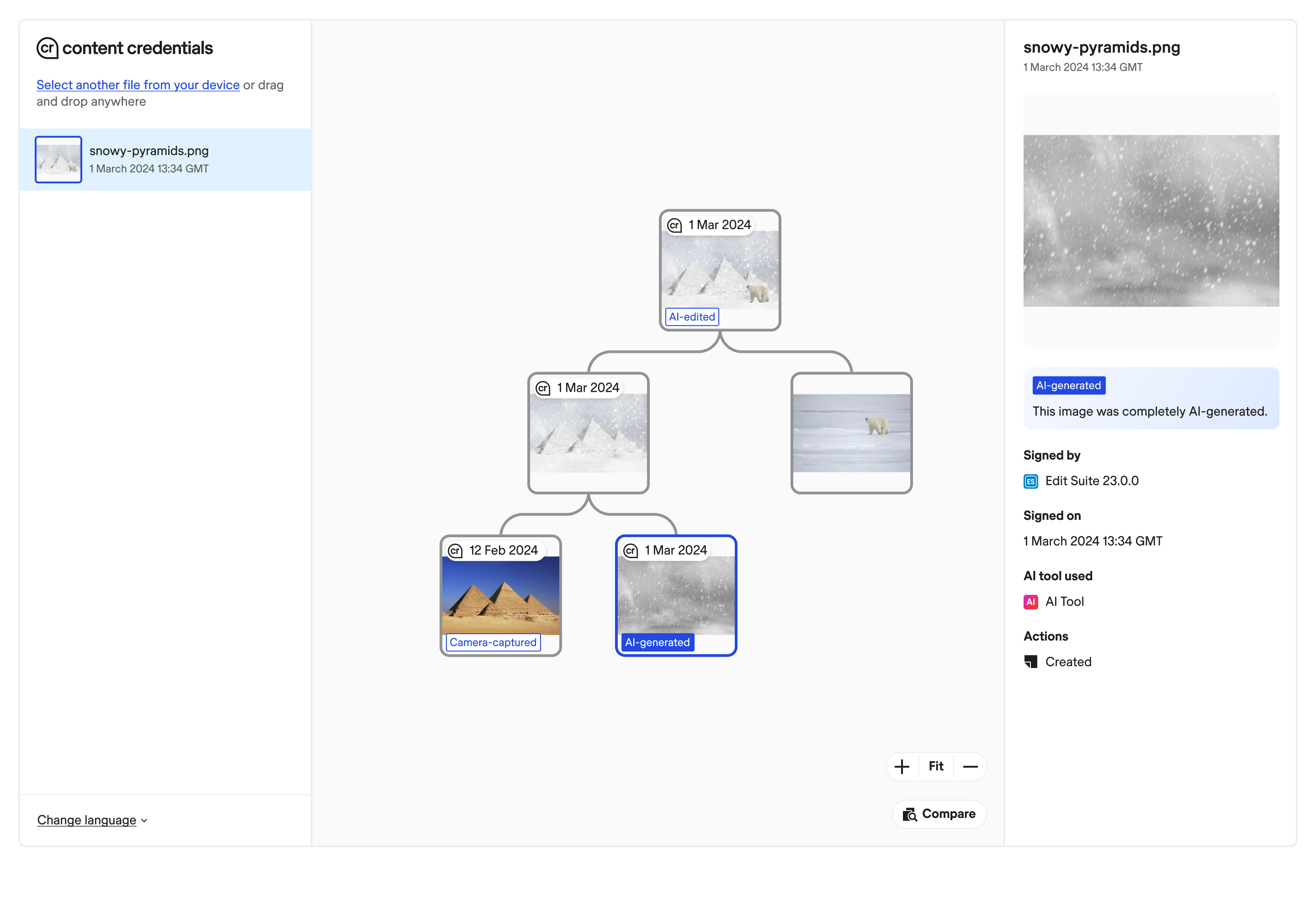
Export a test file with your new settings enabled. Use a C2PA verifier tool or the Adobe Content Credentials viewer to check the embedded data. Ensure that the metadata includes the creator's identity, the tools used, and the timestamp. This verification step confirms that your configuration is working correctly and that the credentials are being embedded as intended.
Verify provenance with the C2PA Viewer
To confirm that credentials are correctly embedded and readable, use the official C2PA Viewer. This tool parses the cryptographic manifest embedded in your file, verifying the signatures of every actor in the content chain. It translates complex cryptographic data into a human-readable report, allowing you to audit the provenance of photos and videos before they are published or distributed.
Upload your content
Navigate to the C2PA Viewer interface and select the file you wish to verify. The tool accepts common media formats, including JPEG, PNG, and MP4. Once uploaded, the viewer begins processing the embedded data. This step is immediate for most files, but larger video files may take a few moments to parse the manifest structure.
Review the verified claims
After processing, the viewer displays a detailed breakdown of the content history. Look for the "Verified" status, which indicates that the cryptographic signatures are intact and the chain of custody is unbroken. The report lists each actor, such as the camera manufacturer or editing software, and the specific actions performed. If any signature fails verification, the tool will flag the specific step where the integrity was compromised.
Export the verification report
For legal or compliance records, export the verification report as a PDF or JSON file. This document serves as proof of authenticity, detailing the exact timeline of edits and the identities of the actors involved. Keeping this record is essential for maintaining a verifiable audit trail, especially in high-stakes environments where content integrity is critical.
Common mistakes that break C2PA tags
C2PA tags are fragile. The cryptographic signature binds to the exact byte sequence of the file. If you modify the file after signing, the signature breaks. This is not a bug; it is the security feature working as intended.
Re-encoding invalidates the signature
Most photo editors and social media platforms re-encode images to save space or apply compression. This changes the bytes. When the bytes change, the hash no longer matches. The C2PA assertion becomes invalid.
To avoid this, use lossless formats like PNG or TIFF for final archival. If you must use JPEG, ensure the editor has a "preserve metadata" option. Never save over the original signed file. Work on copies.
Cropping and resizing strip provenance
Cropping or resizing an image often triggers a re-encode. Even if you do not re-encode, some platforms strip metadata during upload. This includes EXIF data and C2PA assertions.
Always check the file after upload. Use a C2PA validator to confirm the assertion is still present. If it is gone, the platform stripped it. Do not rely on the platform to preserve provenance.
Platform stripping and format conversion
Social media platforms often convert images to their own formats. This process strips metadata. Instagram, Facebook, and X (Twitter) all do this. The C2PA tag is lost.
To maintain authenticity, share the original file. Use direct upload options that preserve metadata. Avoid using platform-specific editors or filters. These tools often re-encode and strip provenance.
How to avoid these mistakes
- Sign the final, unedited file.
- Use lossless formats for archival.
- Verify the signature after any transfer.
- Avoid platform-specific editors.
- Check for metadata stripping.
-
Verify C2PA assertion is present
-
Confirm signature is valid
-
Check file format is lossless
-
Ensure no platform stripping occurred
Software and services for C2PA 2026 compliance
Managing C2PA 2026 standards requires tools that can both embed and verify cryptographic credentials. Creators and enterprises must select software that supports the latest Content Credentials specification to ensure their media is recognized across platforms like Adobe, OpenAI, and Google.
For creators, the priority is embedding provenance directly into the workflow. Adobe Express and Photoshop offer built-in Content Credentials tools that allow users to add attribution and copyright details before exporting. These tools are essential for generating the initial C2PA manifest that travels with the image or video file.
Enterprises need robust verification services to audit incoming media. While many platforms are still integrating full verification pipelines, services like Eyesift provide APIs and dashboards to detect deepfakes and verify the authenticity of content at scale. These services check the integrity of the cryptographic signature to confirm the content has not been altered since creation.
![Adobe Creative Cloud Photography Plan 1TB (Photoshop + Lightroom) | 24-month Subscription | PC/Mac | Digital Download [PC/Mac Online Code]](https://m.media-amazon.com/images/I/81BwJbgSJWL._AC_UY654_QL65_.jpg)
As an Amazon Associate, we may earn from qualifying purchases.
No comments yet. Be the first to share your thoughts!